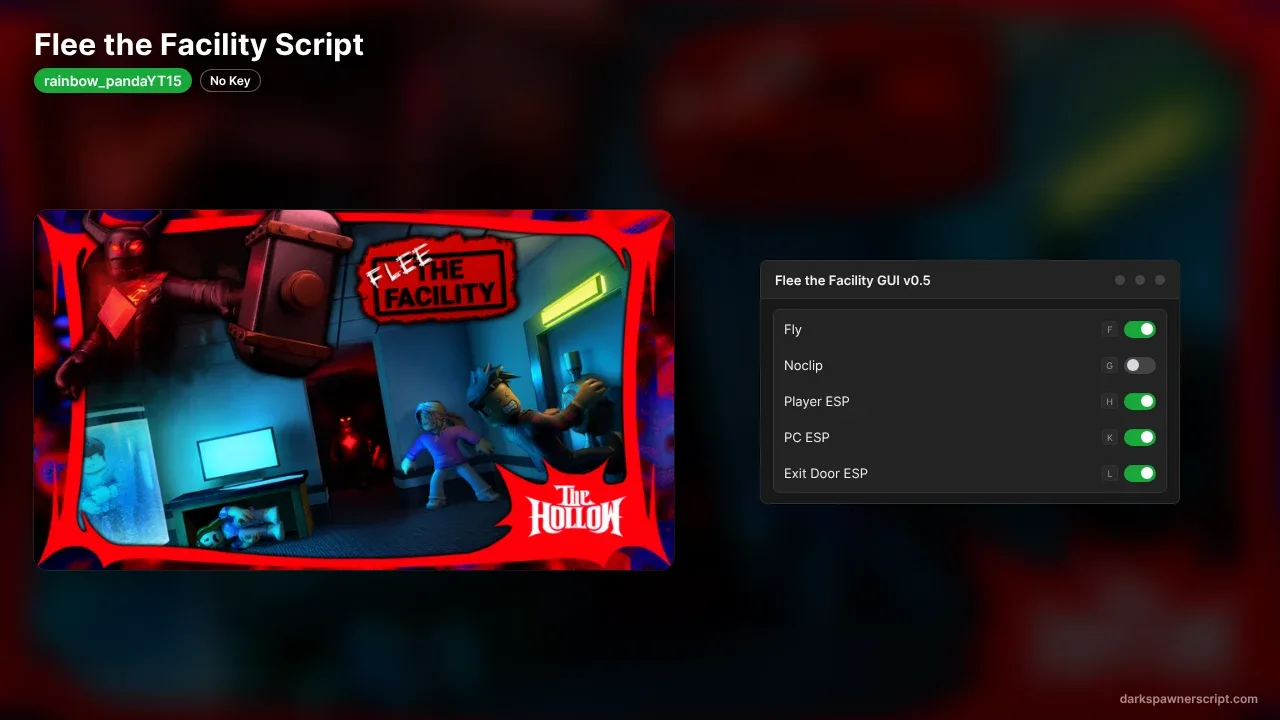
Flee the Facility Script rainbow_pandaYT15: Fly, Player ESP
0 views
Use this rainbow_pandaYT15 hub for Flee the Facility Roblox!! Now you can get features like PC ESP, Noclip, Player ESP, Fly and Exit Door ESP, and More!! The whole GUI is one compact panel with five buttons that turn green when a feature is on and red when it is off. Each button has its own hotkey: F for Fly, G for Noclip, H for Player ESP, K for PC ESP and L for Exit Door ESP. The source is fully open and built to stay light on lag. No key on this one, so paste the loadstring and go!!
Explore more scripts for this game (1)
-- Flee the Facility GUI v0.5 (Optimized / Anti-Lag GUI)
-- Keybinds:
-- F = Fly
-- G = Noclip
-- H = Player ESP
-- K = PC ESP
-- L = Exit Door ESP

local Players = game:GetService("Players")
local RunService = game:GetService("RunService")
local UserInputService = game:GetService("UserInputService")
local Workspace = game:GetService("Workspace")
local CoreGui = game:GetService("CoreGui")

local localPlayer = Players.LocalPlayer

-- States
local noclipEnabled = false
local playerEspEnabled = false
local pcEspEnabled = false
local doorEspEnabled = false
local flyEnabled = false

local noclipConnection
local playerEspConnection
local pcAddedConnection
local doorAddedConnection
local flyConnection

local playerHighlights = {}
local pcHighlights = {}
local doorHighlights = {}

-- Fly Variables
local flySpeed = 50
local bodyVelocity
local bodyGyro

--------------------------------------------------------------------------------
-- CORE FUNCTIONS
--------------------------------------------------------------------------------

-- 1. Noclip Logic
local function updateNoclip()
    if noclipEnabled and localPlayer.Character then
        for _, part in ipairs(localPlayer.Character:GetDescendants()) do
            if part:IsA("BasePart") and part.CanCollide then
                part.CanCollide = false
            end
        end
    end
end

local function toggleNoclip(button)
    noclipEnabled = not noclipEnabled
    if noclipEnabled then
        noclipConnection = RunService.Stepped:Connect(updateNoclip)
        if button then button.BackgroundColor3 = Color3.fromRGB(0, 180, 0) end
    else
        if noclipConnection then
            noclipConnection:Disconnect()
            noclipConnection = nil
        end
        if localPlayer.Character then
            for _, part in ipairs(localPlayer.Character:GetDescendants()) do
                if part:IsA("BasePart") then
                    part.CanCollide = true
                end
            end
        end
        if button then button.BackgroundColor3 = Color3.fromRGB(180, 0, 0) end
    end
end

-- 2. Player ESP Logic (Dark Red)
local function updatePlayerESP()
    for _, player in ipairs(Players:GetPlayers()) do
        if player ~= localPlayer and player.Character then
            local character = player.Character
            local highlight = playerHighlights[player]

            if playerEspEnabled then
                if not highlight or not highlight.Parent then
                    highlight = Instance.new("Highlight")
                    highlight.Name = "DarkRed_PlayerESP"
                    highlight.Adornee = character
                    highlight.FillColor = Color3.fromRGB(150, 0, 0)
                    highlight.OutlineColor = Color3.fromRGB(80, 0, 0)
                    highlight.FillTransparency = 0.5
                    highlight.OutlineTransparency = 0
                    highlight.Parent = character
                    playerHighlights[player] = highlight
                end
            else
                if highlight then
                    highlight:Destroy()
                    playerHighlights[player] = nil
                end
            end
        end
    end
end

local function togglePlayerESP(button)
    playerEspEnabled = not playerEspEnabled
    if playerEspEnabled then
        playerEspConnection = RunService.RenderStepped:Connect(updatePlayerESP)
        if button then button.BackgroundColor3 = Color3.fromRGB(0, 180, 0) end
    else
        if playerEspConnection then
            playerEspConnection:Disconnect()
            playerEspConnection = nil
        end
        for player, highlight in pairs(playerHighlights) do
            if highlight then highlight:Destroy() end
            playerHighlights[player] = nil
        end
        if button then button.BackgroundColor3 = Color3.fromRGB(180, 0, 0) end
    end
end

-- 3. PC ESP Logic (Dark Green)
local function addPCHighlight(obj)
    if obj.Name == "ComputerTable" and (obj:IsA("Model") or obj:IsA("BasePart")) then
        if not pcHighlights[obj] then
            local highlight = Instance.new("Highlight")
            highlight.Name = "DarkGreen_PCEsp"
            highlight.Adornee = obj
            highlight.FillColor = Color3.fromRGB(0, 100, 0)
            highlight.OutlineColor = Color3.fromRGB(0, 50, 0)
            highlight.FillTransparency = 0.5
            highlight.OutlineTransparency = 0
            highlight.Parent = obj
            pcHighlights[obj] = highlight
        end
    end
end

local function togglePCESP(button)
    pcEspEnabled = not pcEspEnabled
    if pcEspEnabled then
        for _, obj in ipairs(Workspace:GetDescendants()) do
            addPCHighlight(obj)
        end
        pcAddedConnection = Workspace.DescendantAdded:Connect(addPCHighlight)
        if button then button.BackgroundColor3 = Color3.fromRGB(0, 180, 0) end
    else
        if pcAddedConnection then
            pcAddedConnection:Disconnect()
            pcAddedConnection = nil
        end
        for obj, highlight in pairs(pcHighlights) do
            if highlight then highlight:Destroy() end
            pcHighlights[obj] = nil
        end
        if button then button.BackgroundColor3 = Color3.fromRGB(180, 0, 0) end
    end
end

-- 4. Fly Logic
local function toggleFly(button)
    flyEnabled = not flyEnabled

    local character = localPlayer.Character
    local hrp = character and character:FindFirstChild("HumanoidRootPart")

    if flyEnabled and hrp then
        bodyVelocity = Instance.new("BodyVelocity")
        bodyVelocity.MaxForce = Vector3.new(1e9, 1e9, 1e9)
        bodyVelocity.Velocity = Vector3.zero
        bodyVelocity.Parent = hrp

        bodyGyro = Instance.new("BodyGyro")
        bodyGyro.MaxTorque = Vector3.new(1e9, 1e9, 1e9)
        bodyGyro.CFrame = hrp.CFrame
        bodyGyro.Parent = hrp

        flyConnection = RunService.RenderStepped:Connect(function()
            if not flyEnabled or not hrp or not hrp.Parent then return end

            local camera = Workspace.CurrentCamera
            local moveVector = Vector3.zero

            if UserInputService:IsKeyDown(Enum.KeyCode.W) then
                moveVector = moveVector + camera.CFrame.LookVector
            end
            if UserInputService:IsKeyDown(Enum.KeyCode.S) then
                moveVector = moveVector - camera.CFrame.LookVector
            end
            if UserInputService:IsKeyDown(Enum.KeyCode.A) then
                moveVector = moveVector - camera.CFrame.RightVector
            end
            if UserInputService:IsKeyDown(Enum.KeyCode.D) then
                moveVector = moveVector + camera.CFrame.RightVector
            end
            if UserInputService:IsKeyDown(Enum.KeyCode.E) then
                moveVector = moveVector + Vector3.new(0, 1, 0)
            end
            if UserInputService:IsKeyDown(Enum.KeyCode.Q) then
                moveVector = moveVector - Vector3.new(0, 1, 0)
            end

            if moveVector.Magnitude > 0 then
                moveVector = moveVector.Unit
            end

            bodyVelocity.Velocity = moveVector * flySpeed
            bodyGyro.CFrame = camera.CFrame
        end)

        if button then button.BackgroundColor3 = Color3.fromRGB(0, 180, 0) end
    else
        if flyConnection then
            flyConnection:Disconnect()
            flyConnection = nil
        end
        if bodyVelocity then bodyVelocity:Destroy() bodyVelocity = nil end
        if bodyGyro then bodyGyro:Destroy() bodyGyro = nil end

        if button then button.BackgroundColor3 = Color3.fromRGB(180, 0, 0) end
    end
end

-- 5. Exit Door ESP Logic (Dark Blue)
local function addDoorHighlight(obj)
    if obj.Name == "ExitDoor" and (obj:IsA("Model") or obj:IsA("BasePart")) then
        if not doorHighlights[obj] then
            local highlight = Instance.new("Highlight")
            highlight.Name = "DarkBlue_ExitDoorESP"
            highlight.Adornee = obj
            highlight.FillColor = Color3.fromRGB(0, 0, 150)
            highlight.OutlineColor = Color3.fromRGB(0, 0, 70)
            highlight.FillTransparency = 0.5
            highlight.OutlineTransparency = 0
            highlight.Parent = obj
            doorHighlights[obj] = highlight
        end
    end
end

local function toggleDoorESP(button)
    doorEspEnabled = not doorEspEnabled
    if doorEspEnabled then
        for _, obj in ipairs(Workspace:GetDescendants()) do
            addDoorHighlight(obj)
        end
        doorAddedConnection = Workspace.DescendantAdded:Connect(addDoorHighlight)
        if button then button.BackgroundColor3 = Color3.fromRGB(0, 180, 0) end
    else
        if doorAddedConnection then
            doorAddedConnection:Disconnect()
            doorAddedConnection = nil
        end
        for obj, highlight in pairs(doorHighlights) do
            if highlight then highlight:Destroy() end
            doorHighlights[obj] = nil
        end
        if button then button.BackgroundColor3 = Color3.fromRGB(180, 0, 0) end
    end
end

--------------------------------------------------------------------------------
-- GUI CREATION
--------------------------------------------------------------------------------

local guiTarget = CoreGui:FindFirstChild("RobloxGui") or localPlayer:WaitForChild("PlayerGui")

if guiTarget:FindFirstChild("OldSchoolControlGui") then
    guiTarget.OldSchoolControlGui:Destroy()
end

local screenGui = Instance.new("ScreenGui")
screenGui.Name = "OldSchoolControlGui"
screenGui.ResetOnSpawn = false
screenGui.Parent = guiTarget

local mainFrame = Instance.new("Frame")
mainFrame.Name = "MainFrame"
mainFrame.Size = UDim2.new(0, 230, 0, 350) -- Made frame slightly wider & taller
mainFrame.Position = UDim2.new(0.05, 0, 0.3, 0)
mainFrame.BackgroundColor3 = Color3.fromRGB(50, 50, 50)
mainFrame.BorderColor3 = Color3.fromRGB(0, 0, 0)
mainFrame.BorderSizePixel = 3
mainFrame.Active = true
mainFrame.Draggable = true
mainFrame.Parent = screenGui

local titleBar = Instance.new("TextLabel")
titleBar.Name = "TitleBar"
titleBar.Size = UDim2.new(1, 0, 0, 30)
titleBar.BackgroundColor3 = Color3.fromRGB(20, 20, 20)
titleBar.BorderColor3 = Color3.fromRGB(0, 0, 0)
titleBar.BorderSizePixel = 1
titleBar.Font = Enum.Font.SourceSansBold
titleBar.Text = "  Flee the Facility GUI v0.5"
titleBar.TextColor3 = Color3.fromRGB(255, 255, 255)
titleBar.TextSize = 16
titleBar.TextXAlignment = Enum.TextXAlignment.Left
titleBar.Parent = mainFrame

local function createButton(text, keyHint, positionY, onClick)
    local button = Instance.new("TextButton")
    button.Size = UDim2.new(0.9, 0, 0, 40)
    button.Position = UDim2.new(0.05, 0, 0, positionY)
    button.BackgroundColor3 = Color3.fromRGB(180, 0, 0)
    button.BorderColor3 = Color3.fromRGB(0, 0, 0)
    button.BorderSizePixel = 2
    button.Font = Enum.Font.SourceSansBold
    button.Text = text .. " [" .. keyHint .. "]"
    button.TextColor3 = Color3.fromRGB(255, 255, 255)
    button.TextSize = 14
    button.Parent = mainFrame

    button.MouseButton1Click:Connect(function()
        onClick(button)
    end)

    return button
end

local flyBtn      = createButton("Fly", "F", 40, toggleFly)
local noclipBtn   = createButton("Noclip", "G", 90, toggleNoclip)
local playerBtn   = createButton("Player ESP", "H", 140, togglePlayerESP)
local pcBtn       = createButton("PC ESP", "K", 190, togglePCESP)
local doorBtn     = createButton("Exit Door ESP", "L", 240, toggleDoorESP)

-- Larger Footer Credit Label
local footerLabel = Instance.new("TextLabel")
footerLabel.Name = "FooterLabel"
footerLabel.Size = UDim2.new(1, 0, 0, 30)
footerLabel.Position = UDim2.new(0, 0, 0, 305)
footerLabel.BackgroundTransparency = 1
footerLabel.Font = Enum.Font.SourceSansBold
footerLabel.Text = "GUI by @rainbow_pandaYT15"
footerLabel.TextColor3 = Color3.fromRGB(255, 255, 255)
footerLabel.TextSize = 14 -- Increased text size and changed to bold
footerLabel.Parent = mainFrame

--------------------------------------------------------------------------------
-- KEYBINDINGS
--------------------------------------------------------------------------------

UserInputService.InputBegan:Connect(function(input, gameProcessed)
    if gameProcessed then return end

    if input.KeyCode == Enum.KeyCode.F then
        toggleFly(flyBtn)
    elseif input.KeyCode == Enum.KeyCode.G then
        toggleNoclip(noclipBtn)
    elseif input.KeyCode == Enum.KeyCode.H then
        togglePlayerESP(playerBtn)
    elseif input.KeyCode == Enum.KeyCode.K then
        togglePCESP(pcBtn)
    elseif input.KeyCode == Enum.KeyCode.L then
        toggleDoorESP(doorBtn)
    end
end)