Tactical: Swat Simulator Script Myolan: Aimbot, NPC ESP
0 views
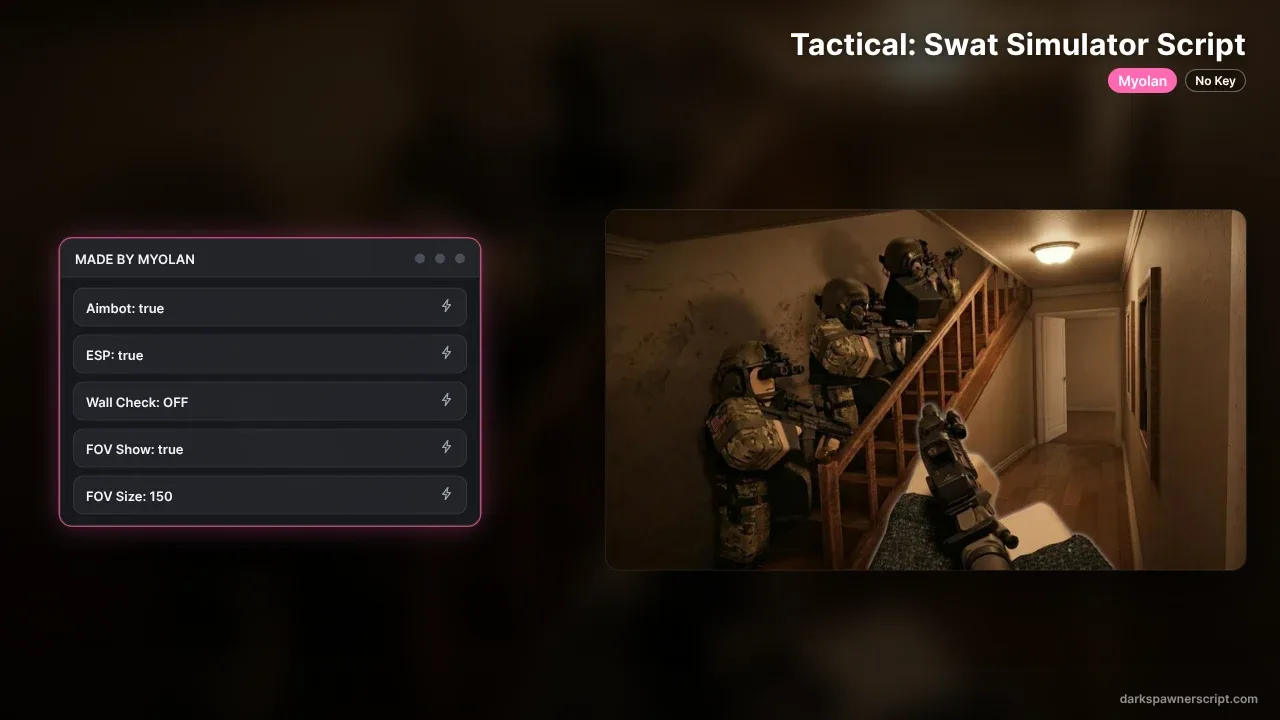
Use this Myolan hub for Tactical: Swat Simulator Roblox!! Now you can get features like Aimbot, NPC ESP, Hostage ESP, Wall Check and FOV Circle, and More!! The whole menu is one pink panel headed MADE BY MYOLAN, with five buttons that show their current state. It loads with Aimbot: true, ESP: true and FOV Show: true, while Wall Check: OFF waits for you to switch it on, and FOV Size starts at 150. The author built it for both mobile and PC, and the aimbot can lock on to the head or the body. No key on this one, so paste the loadstring and go!!
Explore more scripts for this game (1)
local UserInputService = game:GetService("UserInputService")
local RunService = game:GetService("RunService")
local Players = game:GetService("Players")
local TweenService = game:GetService("TweenService")
local Camera = workspace.CurrentCamera
local LocalPlayer = Players.LocalPlayer

-- // Ayarlar
local Settings = {
    Aimbot = true,
    ESP = true,
    WallCheck = true,
    FOV = 150,
    ShowFOV = true,
    ThemeColor = Color3.fromRGB(255, 105, 180),
    DarkBg = Color3.fromRGB(15, 15, 15),
    ArmedColor = Color3.fromRGB(255, 0, 0),
    UnarmedColor = Color3.fromRGB(0, 255, 0),
    Platform = nil
}

-- // UI Helper
local function ApplySmoothDesign(obj, radius, hasStroke, strokeTransparency)
    local corner = Instance.new("UICorner", obj)
    corner.CornerRadius = UDim.new(0, radius)
    if hasStroke then
        local stroke = Instance.new("UIStroke", obj)
        stroke.Color = Settings.ThemeColor
        stroke.Thickness = 1.5
        stroke.Transparency = strokeTransparency or 0
    end
end

-- // Platform Seçim Ekranı
local SelectionGui = Instance.new("ScreenGui", game:GetService("CoreGui"))
local SelectionFrame = Instance.new("Frame", SelectionGui)
SelectionFrame.Size = UDim2.new(0, 320, 0, 160)
SelectionFrame.Position = UDim2.new(0.5, -160, 0.5, -80)
SelectionFrame.BackgroundColor3 = Settings.DarkBg
ApplySmoothDesign(SelectionFrame, 10, true)

local function CreatePlatformBtn(text, pos, platformType)
    local Btn = Instance.new("TextButton", SelectionFrame)
    Btn.Size = UDim2.new(0, 130, 0, 50)
    Btn.Position = pos
    Btn.Text = text
    Btn.BackgroundColor3 = Color3.fromRGB(25, 25, 25)
    Btn.TextColor3 = Color3.new(1,1,1)
    Btn.Font = Enum.Font.GothamSemibold
    Btn.TextSize = 14
    ApplySmoothDesign(Btn, 8, true, 0.4)
    Btn.MouseButton1Click:Connect(function()
        Settings.Platform = platformType
        SelectionGui:Destroy()
    end)
end

CreatePlatformBtn("PC (Right Click)", UDim2.new(0.08, 0, 0.5, 0), "PC")
CreatePlatformBtn("MOBILE (Auto)", UDim2.new(0.53, 0, 0.5, 0), "Mobile")

-- // Ana GUI
local ScreenGui = Instance.new("ScreenGui", game:GetService("CoreGui"))
local MainFrame = Instance.new("Frame", ScreenGui)
MainFrame.BackgroundColor3 = Settings.DarkBg
MainFrame.Position = UDim2.new(0.1, 0, 0.2, 0)
MainFrame.Size = UDim2.new(0, 220, 0, 280)
MainFrame.Visible = true
MainFrame.Active = true
MainFrame.Draggable = true
ApplySmoothDesign(MainFrame, 12, true)

local MainBg = Instance.new("ImageLabel", MainFrame)
MainBg.Size = UDim2.new(1, 0, 1, 0)
MainBg.BackgroundTransparency = 1
MainBg.Image = "rbxassetid://10149736922"
MainBg.ImageTransparency = 0.85
MainBg.ZIndex = 0
ApplySmoothDesign(MainBg, 12, false)

local Title = Instance.new("TextLabel", MainFrame)
Title.Size = UDim2.new(1, 0, 0, 35)
Title.BackgroundColor3 = Settings.ThemeColor
Title.Text = "MADE BY MYOLAN"
Title.TextColor3 = Color3.new(1,1,1)
Title.Font = Enum.Font.GothamBold
ApplySmoothDesign(Title, 10, false)

local function NewBtn(text, prop, pos, isCycle)
    local Btn = Instance.new("TextButton", MainFrame)
    Btn.Size = UDim2.new(0.85, 0, 0, 35)
    Btn.Position = UDim2.new(0.075, 0, 0, pos)
    Btn.BackgroundColor3 = Color3.fromRGB(25, 25, 25)
    Btn.TextColor3 = Color3.new(1,1,1)
    Btn.Text = text .. ": " .. (tostring(Settings[prop]))
    Btn.Font = Enum.Font.GothamSemibold
    ApplySmoothDesign(Btn, 6, true, 0.5)

    Btn.MouseButton1Click:Connect(function()
        if not isCycle then
            Settings[prop] = not Settings[prop]
            Btn.Text = text .. ": " .. (Settings[prop] and "ON" or "OFF")
            Btn.TextColor3 = Settings[prop] and Settings.ThemeColor or Color3.new(1,1,1)
        end
        local originalColor = Btn.BackgroundColor3
        Btn.BackgroundColor3 = Settings.ThemeColor
        TweenService:Create(Btn, TweenInfo.new(0.3), {BackgroundColor3 = originalColor}):Play()
    end)
    return Btn
end

NewBtn("Aimbot", "Aimbot", 50)
NewBtn("ESP", "ESP", 95)
NewBtn("Wall Check", "WallCheck", 140)
NewBtn("FOV Show", "ShowFOV", 185)

local fovBtn = NewBtn("FOV Size", "FOV", 230, true)
local sizes = {0, 50, 100, 150, 250}
local sIdx = 4
fovBtn.MouseButton1Click:Connect(function()
    sIdx = sIdx + 1
    if sIdx > #sizes then sIdx = 1 end
    Settings.FOV = sizes[sIdx]
    fovBtn.Text = "FOV Size: " .. (Settings.FOV == 0 and "Off" or Settings.FOV)
end)

-- // Logic
local FOVCircle = Drawing.new("Circle")
FOVCircle.Thickness = 1.5
FOVCircle.Transparency = 0.8
FOVCircle.Color = Settings.ThemeColor

local function HasTool(model)
    return model:FindFirstChildOfClass("Tool") ~= nil
end

local function GetTarget()
    local center = Vector2.new(Camera.ViewportSize.X / 2, Camera.ViewportSize.Y / 2)
    local closestDist = Settings.FOV
    local target = nil
    if Settings.FOV == 0 or not Settings.Aimbot then return nil end

    for _, obj in pairs(workspace:GetChildren()) do
        local hum = obj:FindFirstChildOfClass("Humanoid")
        local head = obj:FindFirstChild("Head")
        if hum and head and obj ~= LocalPlayer.Character and HasTool(obj) then
            local pos, vis = Camera:WorldToViewportPoint(head.Position)
            if vis then
                local dist = (Vector2.new(pos.X, pos.Y) - center).Magnitude
                if dist < closestDist then
                    local obs = Camera:GetPartsObscuringTarget({head.Position}, {LocalPlayer.Character, obj})
                    if not Settings.WallCheck or #obs == 0 then
                        closestDist = dist
                        target = head
                    end
                end
            end
        end
    end
    return target
end

RunService.RenderStepped:Connect(function()
    if not Settings.Platform then return end

    local center = Vector2.new(Camera.ViewportSize.X / 2, Camera.ViewportSize.Y / 2)
    FOVCircle.Position = center
    FOVCircle.Radius = Settings.FOV

    -- FOV Dairesi sadece Size: Off veya Show: Off ise kapanır (Aimbot ayarından bağımsız)
    FOVCircle.Visible = (Settings.ShowFOV and Settings.FOV > 0)

    local isAiming = (Settings.Platform == "PC" and UserInputService:IsMouseButtonPressed(Enum.UserInputType.MouseButton2)) or (Settings.Platform == "Mobile")

    if Settings.Aimbot and isAiming then
        local t = GetTarget()
        if t then Camera.CFrame = CFrame.new(Camera.CFrame.Position, t.Position) end
    end

    if Settings.ESP then
        for _, obj in pairs(workspace:GetChildren()) do
            local hum = obj:FindFirstChildOfClass("Humanoid")
            if hum and obj ~= LocalPlayer.Character then
                local hl = obj:FindFirstChild("MyolanESP") or Instance.new("Highlight", obj)
                hl.Name = "MyolanESP"
                hl.FillColor = HasTool(obj) and Settings.ArmedColor or Settings.UnarmedColor
                hl.OutlineColor = hl.FillColor
                hl.Enabled = true
            end
        end
    else
        for _, obj in pairs(workspace:GetChildren()) do
            local hl = obj:FindFirstChild("MyolanESP")
            if hl then hl:Destroy() end
        end
    end
end)

-- Toggle Menu
local ToggleButton = Instance.new("ImageButton", ScreenGui)
ToggleButton.Size = UDim2.new(0, 50, 0, 50)
ToggleButton.Position = UDim2.new(0, 15, 0.5, -25)
ToggleButton.BackgroundColor3 = Settings.DarkBg
local content = Players:GetUserThumbnailAsync(LocalPlayer.UserId, Enum.ThumbnailType.HeadShot, Enum.ThumbnailSize.Size150x150)
ToggleButton.Image = content
ApplySmoothDesign(ToggleButton, 25, true)

ToggleButton.MouseButton1Click:Connect(function() MainFrame.Visible = not MainFrame.Visible end)
UserInputService.InputBegan:Connect(function(input, gp)
    if not gp and input.KeyCode == Enum.KeyCode.LeftControl then MainFrame.Visible = not MainFrame.Visible end
end)